
Marketing automation should make the customer journey more responsive without making the organization less aware of what it is sending.
The weak version of automation is simple:
trigger → message
The strong version includes identity, consent, business state, decision logic, channel orchestration, measurement and human control.
As automation systems become more capable, the architecture matters more than the number of workflows.
What belongs in a marketing automation stack?
A complete automation stack typically contains six capabilities:
- customer and account data;
- identity and segmentation;
- journey orchestration;
- messaging channels;
- conversion feedback;
- governance and monitoring.
The vendor names can change. These capabilities remain.
Start with data, not campaigns
Automation depends on knowing enough about the customer to make a useful decision.
Important data categories include:
Profile data
- email;
- locale;
- geography;
- account;
- plan;
- lifecycle stage.
Behavioral data
- page views;
- feature usage;
- purchases;
- content consumed;
- cart activity;
- form submissions.
Commercial data
- opportunity status;
- revenue;
- renewal date;
- subscription state;
- product tier.
Preference and consent data
- email consent;
- SMS consent;
- channel preferences;
- frequency controls.
If those inputs are unreliable, automation becomes confidently wrong.
A sophisticated journey engine cannot compensate for stale lifecycle state or duplicate identities.
Decide which system owns customer state
Customer data may exist in:
- CRM;
- product database;
- data warehouse;
- ecommerce platform;
- customer data platform;
- messaging platform.
Do not let every automation tool create its own version of reality.
Define the source of truth for important states.
Examples:
- subscription status → billing system;
- opportunity stage → CRM;
- product activation → product analytics/database;
- consent → consent or messaging system;
- campaign engagement → automation platform.
Then synchronize the necessary fields.
Use event-driven automation
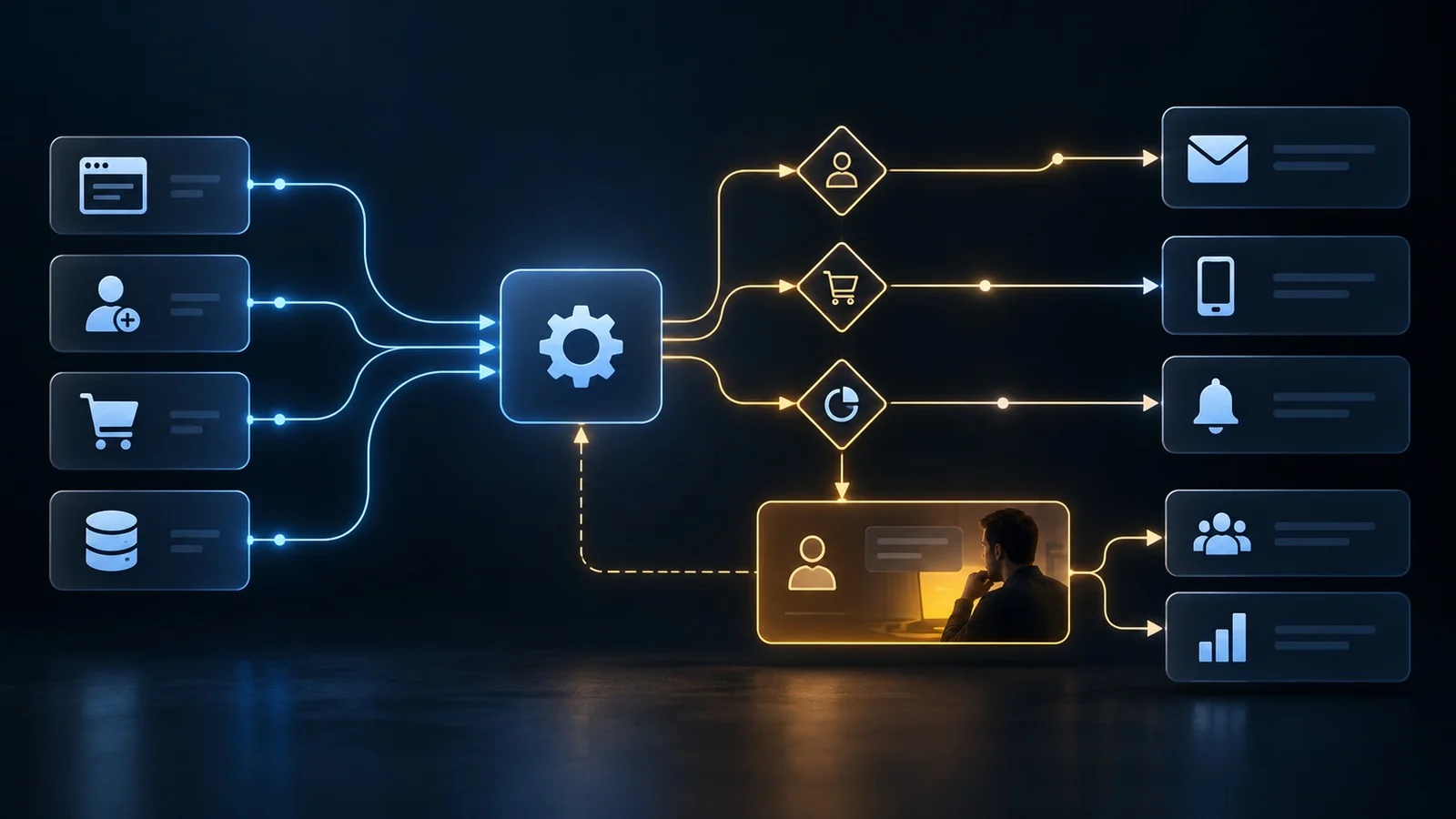
Scheduled campaigns still have a role, but high-value automation is often event-driven.
Examples:
- a lead requests a demo;
- a trial reaches a key activation step;
- a customer abandons checkout;
- an account crosses an engagement threshold;
- a subscription is approaching renewal;
- a user becomes inactive;
- a purchase is completed.
Customer.io describes automations as workflows where people enter based on triggers and filters, then move through actions in a journey.
The architecture principle is broader:
business events should trigger state-aware workflows.
The automation should ask not only “what happened?” but also “is this customer still eligible for this action?”
Build journeys from state transitions
A lifecycle can be modeled as states.
For example:
visitor → lead → qualified lead → trial → activated → customer → retained → expansion
An automation can help move a person between these states.
But it should not assume that messaging caused the transition.
The journey engine needs conditions such as:
- stop onboarding once activation occurs;
- remove a lead from nurture after an opportunity opens;
- suppress acquisition offers for current customers;
- stop renewal reminders after renewal;
- prevent abandoned-cart messages after purchase.
Exit logic is as important as entry logic.
Separate orchestration from channel delivery
The orchestration layer decides:
- who enters;
- when;
- what condition applies;
- which branch follows;
- when the person exits.
The channel layer sends:
- email;
- SMS;
- push;
- in-app messages;
- ads audiences;
- sales tasks.
Some platforms combine both.
The conceptual separation is still useful because the team should know whether a problem comes from decision logic or delivery infrastructure.
A customer can qualify for the correct journey while delivery fails because of:
- invalid email;
- missing push token;
- consent;
- channel outage;
- rate limit.
Use branches carefully
Branching makes automation powerful and difficult to maintain.
Useful branches include:
- customer vs. prospect;
- activated vs. not activated;
- high-value vs. low-value account;
- geography;
- product interest;
- engagement state.
Avoid building a 70-branch flow that only one employee understands.
As complexity grows, consider separating one giant workflow into smaller state-based workflows.
A good automation should be explainable from a diagram.
Add human checkpoints for high-risk actions
Not everything should fire automatically.
Human approval may be appropriate for:
- large account outreach;
- sensitive customer recovery;
- unusual discounts;
- high-value partner communication;
- public-facing campaign changes;
- regulated or legal-sensitive messaging.
Automation can prepare the context and create the task.
The human makes the consequential decision.
This hybrid model is often more reliable than choosing between “fully manual” and “fully automated.”
Build channel frequency controls
The customer does not experience each workflow separately.
They experience the combined communication volume.
A person might simultaneously qualify for:
- onboarding email;
- promotional email;
- cart reminder;
- renewal message;
- product announcement.
Without global frequency control, individually reasonable journeys create a bad customer experience.
The stack should support:
- suppression;
- priority;
- quiet periods;
- frequency caps;
- channel preference;
- transactional-message exceptions.
Journey orchestration should operate at the customer level, not only the campaign level.
Consent is infrastructure
Consent should not be added as a final filter.
It belongs in the architecture.
Track:
- what the person consented to;
- when;
- by which method;
- in which jurisdiction;
- whether consent was withdrawn.
Automation must respect the latest valid state.
This matters for both compliance and trust.
Use conversion events as feedback
A workflow should have an intended outcome.
Examples:
- activation;
- demo booking;
- first purchase;
- repeat purchase;
- renewal;
- feature adoption.
That outcome should feed back into the automation layer.
Customer.io's journey tooling, for example, lets teams inspect a person's path through an automation and see deliveries and conversions.
This is useful operationally because the team can diagnose:
- why someone entered;
- which messages were sent;
- where they exited;
- whether the desired action occurred.
Automation without observability becomes difficult to debug.
Connect automation to analytics
The messaging platform should not become the only performance view.
Connect automation results to broader analytics.
Questions include:
- Do activated users from this journey retain longer?
- Does the nurture sequence create qualified opportunities?
- Do recovered carts have higher refund rates?
- Does the reactivation campaign increase repeat purchase?
- Is the channel incremental?
This usually requires joining lifecycle data with:
- CRM;
- product data;
- revenue data;
- web analytics;
- experiment data.
Where AI agents fit
AI can improve parts of automation, including:
- classification;
- summarization;
- lead research;
- message variants;
- routing;
- anomaly detection.
But deterministic business rules remain valuable.
A safe architecture separates:
deterministic constraints
- consent;
- plan eligibility;
- geography;
- customer state;
- frequency cap.
from
probabilistic assistance
- recommended message;
- prioritization;
- intent classification;
- suggested next action.
Do not let probabilistic output override hard business constraints without a deliberate policy.
Marketing automation stack by capability
- Source systems — CRM, commerce, product, billing
- Data layer — Profiles, events, identity
- Segmentation — Audiences and eligibility
- Orchestration — Triggers, conditions, waits, branches
- Messaging — Email, SMS, push, in-app
- Activation — Ad audiences, sales tasks
- Analytics — Conversions, cohorts, revenue
- Governance — Consent, frequency, suppression
- Monitoring — Failures, deliverability, workflow health
The best tool stack may use two products or ten.
Count capabilities, not logos.
What to automate first
Start with workflows that are:
- frequent;
- rules-based;
- measurable;
- valuable;
- low-risk.
Good early examples:
Welcome and activation
Trigger after signup. Exit when the user reaches activation.
Lead routing
Route based on region, company size or intent.
Abandoned checkout
Trigger after meaningful checkout intent. Suppress after purchase.
Renewal preparation
Start before a contract date. Branch on risk and account value.
Content subscription
Deliver according to declared preference and engagement.
These workflows have clear states and outcomes.
What not to automate first
Avoid early automation when the process is:
- poorly defined;
- politically sensitive;
- rare;
- highly variable;
- impossible to measure;
- dependent on missing data.
Automating a broken process makes it faster, not better.
Automation governance checklist
For every workflow, document:
- owner;
- business objective;
- entry trigger;
- eligibility filters;
- exit conditions;
- suppression rules;
- messages/actions;
- primary conversion;
- guardrail metrics;
- consent requirements;
- failure alerts;
- review date.
Also ask:
- What happens when the customer changes state mid-journey?
- What system confirms that state?
- Can the workflow be paused quickly?
- Can support or sales see what the customer received?
- Is there a manual override?
- Is the workflow still needed?
Marketing automation works best as operational infrastructure.
The objective is not to send more messages. It is to make customer interactions timely, relevant, measurable and controllable.